
Moving from .local to .internal for DNS home resolution
For many years I’ve been using the .local DNS domain name for all my devices at home and I was doing it wrong.
I’m using private DNS servers in my home network. Basically two Adguard Home DNS servers and ad-blockers, where I configure my internal devices under .local domain: nas.local or printer.local for example.
Domains
Do not use .local
The .local domain is reserved for mDNS (multicast DNS) and using to resolve your home devices may cause conflicts or very hard to diagnose network issuess.
I was using this one and time to time one of the devices was not able to find another. The reason is how they implment the resolution. Several systems have improved how they support mDNS and over the time, they were not sending the DNS requests to my servers, because the protocol was expecting to solver these queries locally at the system.
So, .local should not be used as the domain on your network.
Consider avoiding ad-hoc domains
The domains .lan, .home, .network, .private are frequently used for home devices because they are not currently allocated as TLDs. However the behaviour of these domains is not defined or guaranteed to be suitable for use. They also suffer from the problem that queries for these domains if unanswered by your network may leak to your upstream DNS provider.
You can, of course, buy a DNS domain, like pacoorozco.info, and use it, but if you do not own a domain, there are two options available to you:
.home.arpa
The domain .home.arpa was officially reserved for home networks. It have the advantage that there is no possible risk of collision with an external domain name, and from a privacy perspective device names on your network should not leak to your upstream dns provider. DNS resolvers doesn’t forward these kind of DNS queries.
It has been there for a lot of time and I was not aware about it. This domain name could fix almost all the problems I had but it’s a bit ugly and not very straight forward to remember to my family members.
.internal
In 2025, ICANN approved the .internal domain as a top-level domain that would never be delegated in the global domain name system (DNS) root. Doing so wou means hosts using this domain could never be accessed on the open internet, a domain that could be used for internal networks without fear of conflict or confusion.
Note: DNS resolvers should not forward requests for local domain names to the upstream DNS (neither
.home.arpanor.internal).
Migrate to .internal
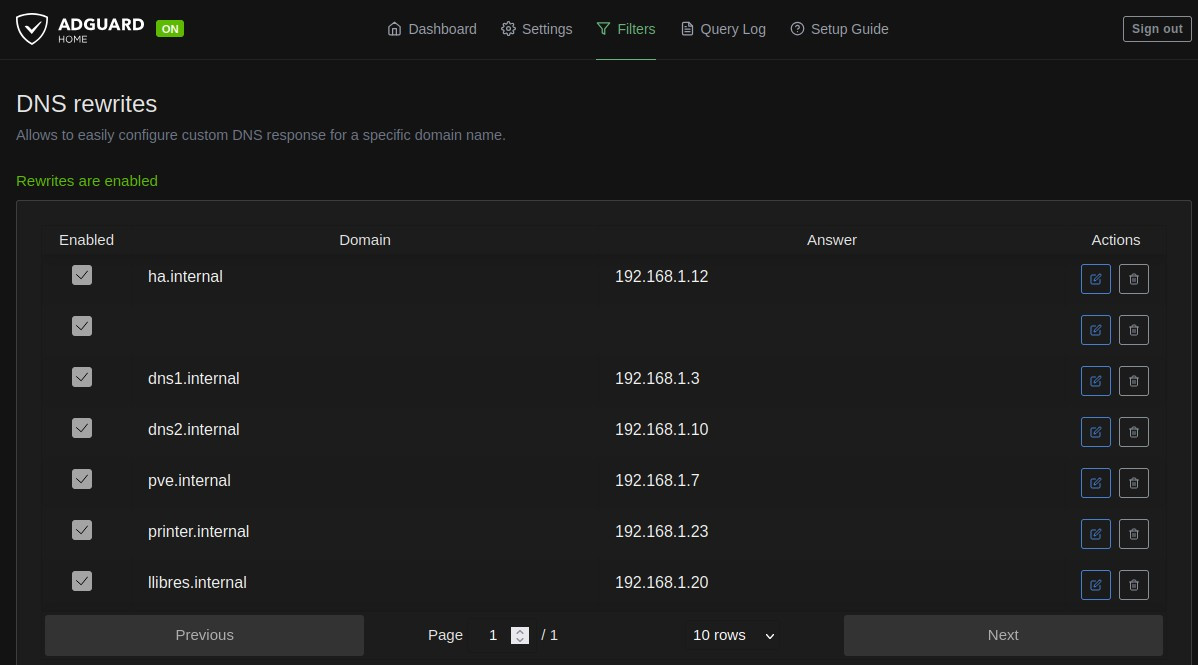
In order to migrate for .local to .internal, I just configured my Adguard DNS servers to replace one by the other. It was very straight forward, Filters –> DNS rewrites –> Add DNS rewrite. You will see a simple form with two fields: Domain and IP Address.
The record is immediately active, no restart needed. You can add as many records as you want, one per service or server. In my homelab, for example, I have records for my NAS, my Proxmox nodes, and each of the services I expose through web.
Verifying it works
Once I configured all the devices, it was time to verify everything works correctly. The quickest way is to use nslookup or dig from a terminal on that device.
For example, to verify that printer.internal resolves correctly:
nslookup printer.internal
You should see an output like this:
Server:		192.168.1.10
Address:	192.168.1.10#53

Name:	printer.interal
Address: 192.168.1.23
Here, 192.168.1.10 is my AdGuard Home, and 192.168.1.23 is the IP I configured in the DNS record. The local DNS resolution is working!
When I was checking some of the web services, https://dns1.internal. I realize that the SSL certificates were issued for the old domain.
Certificate migration
I use an internal Certificate Authority (CA) to issue certificates for some of my internal services: DNS, NAS, other web applications…
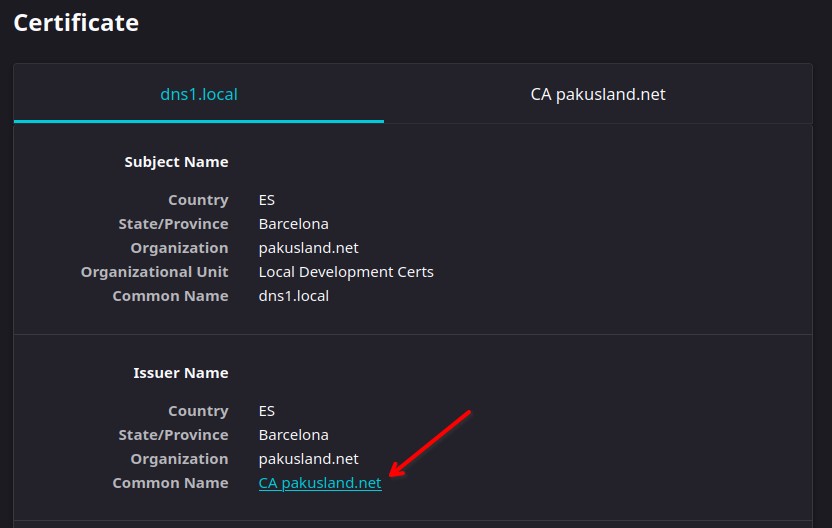
I had to create a new certificate for each of them using the new domain and install it one by one, this was the most tedious task. And, honestly, I don’t know if so many people uses their own CA to sign certificates.
Wrapping up
That’s everything I need to have a clean, network-wide local DNS setup at home, that resolves local domain names like *.internal to the correct IPs. Until next time, enjoy!